④ Quote & Order — Your Design, Straight to the Cart
How to read the quote
Press Quote at the top and the parts list opens on the right.
- 2D top-view layout — the overall size (mm) seen from above. Compare it against your measured space.
- Parts list — which part sets (post set, shelf set, etc.) make up your design, and how many. It recalculates instantly as you change the design.
- Estimated amount — the amount for the current configuration (shipping not included). The final checkout amount is confirmed on the order page.
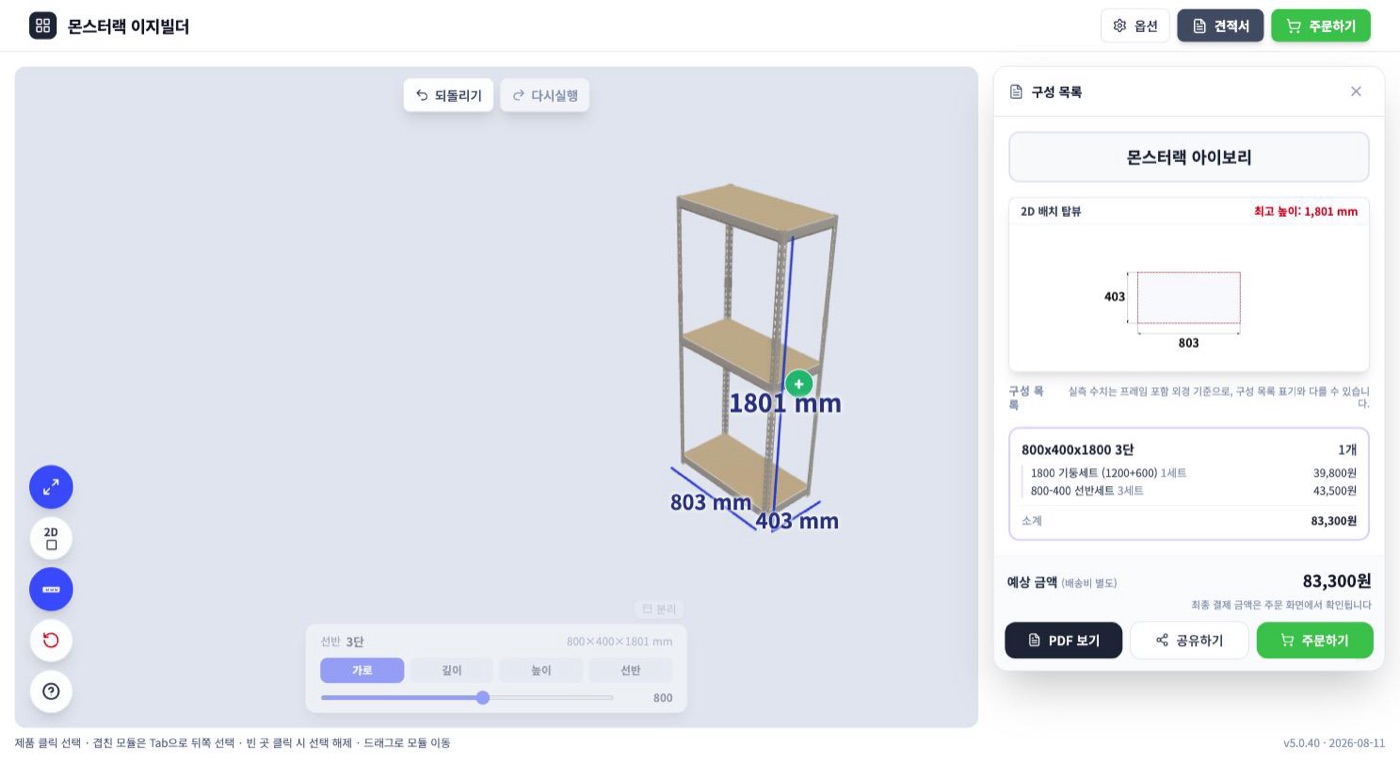
Press View PDF to download the quote as a file — handy to keep or to use for approval.
Order
- Press Order (on the quote or at the top of the screen).
- The parts in your design are automatically added to the Sangdo Furniture official-store cart — a brief notice shows while they're being added.
- Check the quantities in the cart and check out as usual. That's it.
💡 Before ordering, save one design link with Share — for unclear parts after delivery, for reordering, or for support, that one link is all you need.